06
Hosting & Deployment
Hosting and deployment services for founders and small teams who need their website or app live on infrastructure that actually holds up under real traffic. I set up your hosting, build a proper deployment pipeline, and configure monitoring so you find out about problems before your customers do. No guessing with server settings, no site going down during your biggest week.
Why a slow or unstable site is costing you more than you think#
A site that takes four seconds to load is not just annoying, it is actively losing you customers before they see anything. Most visitors leave before a slow page even finishes loading, and Google quietly ranks slow sites lower too. Then there is the other failure mode: a site that works fine most days but falls over the one day it matters, like a product launch or a press mention, because nobody set it up to handle a spike in traffic. Both problems come from the same root cause, hosting that was never properly configured in the first place.
What hosting and deployment actually means#
Hosting is where your website or app actually lives and runs. Deployment is the process of getting your code from your computer onto that server safely, ideally without any downtime and without you needing to touch a terminal every time something changes. Done right, this also includes a CDN so your site loads fast no matter where your visitors are, automatic SSL so the browser shows the padlock icon, and monitoring that alerts someone the moment something breaks, instead of you finding out from an angry customer email.
What is included#
- Hosting setup on a modern platform like Vercel, AWS, or a VPS, chosen based on what your app actually needs
- A deployment pipeline so pushing new code goes live automatically, with zero downtime
- CDN and caching configuration so pages load fast for visitors anywhere in the world
- SSL certificate setup so your site is secure and shows the padlock, not a warning
- Uptime and error monitoring with alerts, so problems get caught before customers notice
- Automated backups, so a bad deploy or a database mistake is never a full disaster
How the setup process works#
Getting hosting right the first time saves you from a scramble later, so I follow a consistent process on every project.
- Discovery and audit - I review your app, expected traffic, and current setup if one already exists
- Infrastructure setup - I provision hosting, configure the CDN, SSL, and environment variables
- Deployment pipeline - I set up automatic deploys from your code repository, so shipping updates is one click, not a manual upload
- Load and failure testing - I test how the setup handles a traffic spike and confirm backups actually restore correctly
- Launch and monitoring handover - the site goes live, monitoring is active, and you get a plain language explainer of what was set up
A look at what a deployment pipeline actually does#
For anyone curious what happens behind the scenes, here is a simplified example of the kind of automated deployment workflow I set up. Every time code is pushed, it gets tested and deployed automatically, with no manual steps.
name: Deploy

on:
  push:
    branches: [main]

jobs:
  deploy:
    runs-on: ubuntu-latest
    steps:
      - uses: actions/checkout@v4

      - name: Install dependencies
        run: npm ci

      - name: Run tests
        run: npm test

      - name: Build
        run: npm run build

      - name: Deploy
        run: npm run deploy
        env:
          DEPLOY_TOKEN: ${{ secrets.DEPLOY_TOKEN }}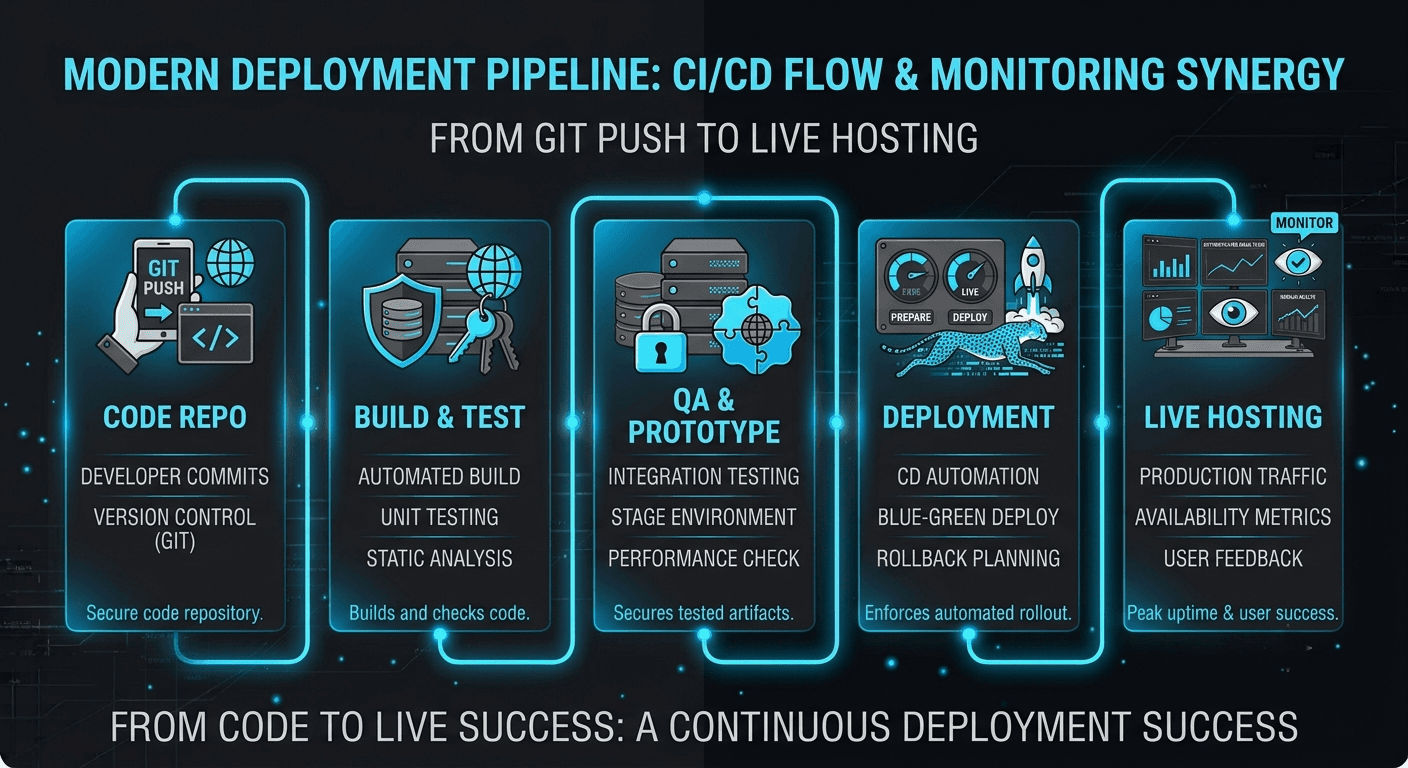
Pricing and how engagement works#
Initial hosting and deployment setup is a fixed price, quoted after I understand your app and expected traffic. If you want ongoing monitoring and management after launch, that runs as a simple monthly retainer, so someone is actually watching for problems instead of you finding out when the site is already down.
| Tier | Best for | Typical price | Timeline |
|---|---|---|---|
| Basic setup | A single site or small app on standard hosting | Fixed price, quoted after discovery | 2 to 3 days |
| Full pipeline setup | Apps needing CI/CD, staging environments, and monitoring | Fixed price, quoted after discovery | 4 to 6 days |
| Managed hosting | Ongoing monitoring, updates, and support after launch | Monthly retainer, quoted after discovery | Ongoing |
Timeline: what to expect#
A basic hosting setup for a single site usually takes 2 to 3 days. A full pipeline with staging environments, automated testing, and monitoring typically takes 4 to 6 days. If you are launching alongside a new build, I fold hosting setup into the same timeline so there is no gap between the app being finished and it actually being live.
How we will talk during the setup#
You get an update at each major milestone, not silence followed by a surprise. Once monitoring is active, you also get direct alerts if anything goes wrong after launch, so you are never the last to know your own site is down.
What is included, what is not, and what happens after launch#
Every setup includes hosting configuration, the deployment pipeline, SSL, backups, and monitoring setup, plus 14 days of post launch support for anything that surfaces once real traffic hits the site. What is not included: writing new app features, which falls under web and app development, and ongoing day to day server management unless you choose the managed hosting tier. If something breaks that traces back to the original setup within those first 14 days, I fix it at no extra cost.
Can this handle a real traffic spike?#
This is the question I get most, usually from founders who remember a launch day where the site went down. Yes, the setups I build use autoscaling infrastructure and a CDN specifically so a spike in visitors does not take the site offline, and I load test before calling a project done, not after something breaks. If your app also needs background jobs or scheduled tasks running reliably, that pairs well with automation and agent development, and if the app itself needs new backend endpoints to support growth, that is covered under API and backend development.
A recent launch, in short#
One client came to me after their site crashed during a product feature on social media, taking down checkout for most of the day. I rebuilt their hosting setup with a CDN, autoscaling, and proper monitoring, then load tested it against traffic well above what caused the original crash. Their next big traffic spike, from a similar feature a few months later, saw zero downtime and page load times under one second throughout. I wrote more about choosing between hosting platforms, Vercel versus AWS for small business apps breaks down the real tradeoffs.
What you get
Your site stays up when it matters most
Autoscaling and load tested infrastructure mean a traffic spike from a launch or a feature does not take your site offline right when you need it most.
Pages load fast, everywhere
CDN and caching setup means visitors get a fast experience whether they are next door or across the world, which helps both conversions and Google rankings.
You find out about problems first
Uptime and error monitoring alerts you the moment something breaks, so you hear it from a system, not from a frustrated customer.
Shipping updates is no longer stressful
An automated deployment pipeline means new code goes live safely with zero downtime, instead of a manual upload that might break something.
Why work with me
I have rebuilt hosting setups for clients after a bad launch day, and the pattern is almost always the same: nobody load tested the site before it needed to handle real traffic. I do not treat hosting as an afterthought tacked onto a build. I test failure scenarios before calling a setup finished, and I stay reachable if something breaks in the first two weeks after launch, instead of disappearing once the invoice is paid. You get infrastructure decisions made by someone who has watched what happens when they are made carelessly.
Other services
Questions
Frequently asked
Answers to the things clients ask before we start. Still unsure? Drop me a message.
How much does hosting and deployment setup cost?
A basic setup for a single site is quoted as a fixed price after a short discovery call, usually landing in the range of a few days of work. A full pipeline with staging environments and monitoring costs more and is also quoted upfront in writing. Ongoing managed hosting runs as a separate monthly retainer if you want it.
How long does setup take?
A basic setup usually takes 2 to 3 days. A full deployment pipeline with monitoring and staging environments typically takes 4 to 6 days. If this is part of a new app launch, I fold the timeline into the overall build schedule.
Do you offer ongoing hosting management after launch?
Yes, through the managed hosting tier, which runs as a monthly retainer. This covers ongoing monitoring, updates, and being the person who gets the alert if something goes wrong, rather than you finding out on your own.
Can you migrate a site that is already hosted somewhere else?
Yes. Migrating an existing site to better hosting is a common request, and I plan the migration to avoid downtime, usually by setting up the new environment fully before switching traffic over.
Ready when you are
Let's scope your hosting & deployment project.
Bring your requirements, your constraints, or just a rough idea. Thirty minutes, a clear plan, and a written quote — no obligation either way.