05
Custom Email Setup
Custom email setup for founders and small businesses who are still sending client invoices from a @gmail.com address, or whose emails keep landing in spam. I set up your domain email, configure the records that control deliverability, and test everything before handover, so every email you send looks professional and actually gets read.
Why a gmail.com address is quietly costing you clients#
If you are sending proposals and invoices from a personal gmail.com or outlook.com address, some clients are already judging you for it before they finish reading the email. It signals a business that has not set itself up properly, and in competitive quotes that small doubt can lose you the job. The bigger cost is invisible: emails from free addresses and poorly configured domains get flagged by spam filters more often, so your cold outreach, invoices, and even password resets to your own app never reach the inbox at all.
What custom email setup actually covers#
Custom email setup means your email runs on your own domain, like you@yourbusiness.com, and is configured correctly behind the scenes so mail providers trust it. This includes setting up your mailbox provider, usually Google Workspace or Microsoft 365, and configuring the DNS records that prove to Gmail and Outlook that your emails are legitimate. If you run a web app that sends automated emails, like order confirmations or password resets, this also covers setting up a transactional email service such as Resend, Postmark, or SendGrid, so those emails do not end up in spam either.
What is included#
- Domain email setup on Google Workspace, Microsoft 365, or a provider you already use
- SPF, DKIM, and DMARC records configured correctly on your domain, not just copy pasted defaults
- Deliverability testing so we confirm your emails land in the inbox, not spam, before calling it done
- Transactional email setup for your app or website, if you send automated emails like receipts or alerts
- Mailbox aliases and forwarding, such as info@ and support@ addresses that route to the right inbox
- A short handover document explaining what was set up, in plain language, so you are not locked out of your own setup
How the setup process works#
Email setup is quick compared to a full build, but skipping steps is exactly how deliverability breaks later. I follow the same process every time.
- Discovery call - I check your current domain, DNS provider, and what you actually need email for
- Provider and record setup - I configure your mailbox provider and add the correct SPF, DKIM, and DMARC records
- Deliverability testing - I send test emails to major providers and check spam scores before handover
- Handover and walkthrough - you get login access, a short explainer, and I show you exactly what changed
- Follow up check - about a week after launch I check your deliverability again, since some records take days to fully propagate
A look at what actually gets configured#
For the technically curious, here is a simplified example of the kind of DNS records that get added to your domain during setup. These three records together are what tell Gmail and Outlook your email is trustworthy.
; SPF record - lists which servers are allowed to send email for your domain
yourbusiness.com.  TXT  "v=spf1 include:_spf.google.com ~all"

; DKIM record - lets receiving servers verify the email was not altered in transit
google._domainkey.yourbusiness.com.  TXT  "v=DKIM1; k=rsa; p=MIIBIjANBg..."

; DMARC record - tells providers what to do if SPF or DKIM checks fail
_dmarc.yourbusiness.com.  TXT  "v=DMARC1; p=quarantine; rua=mailto:reports@yourbusiness.com"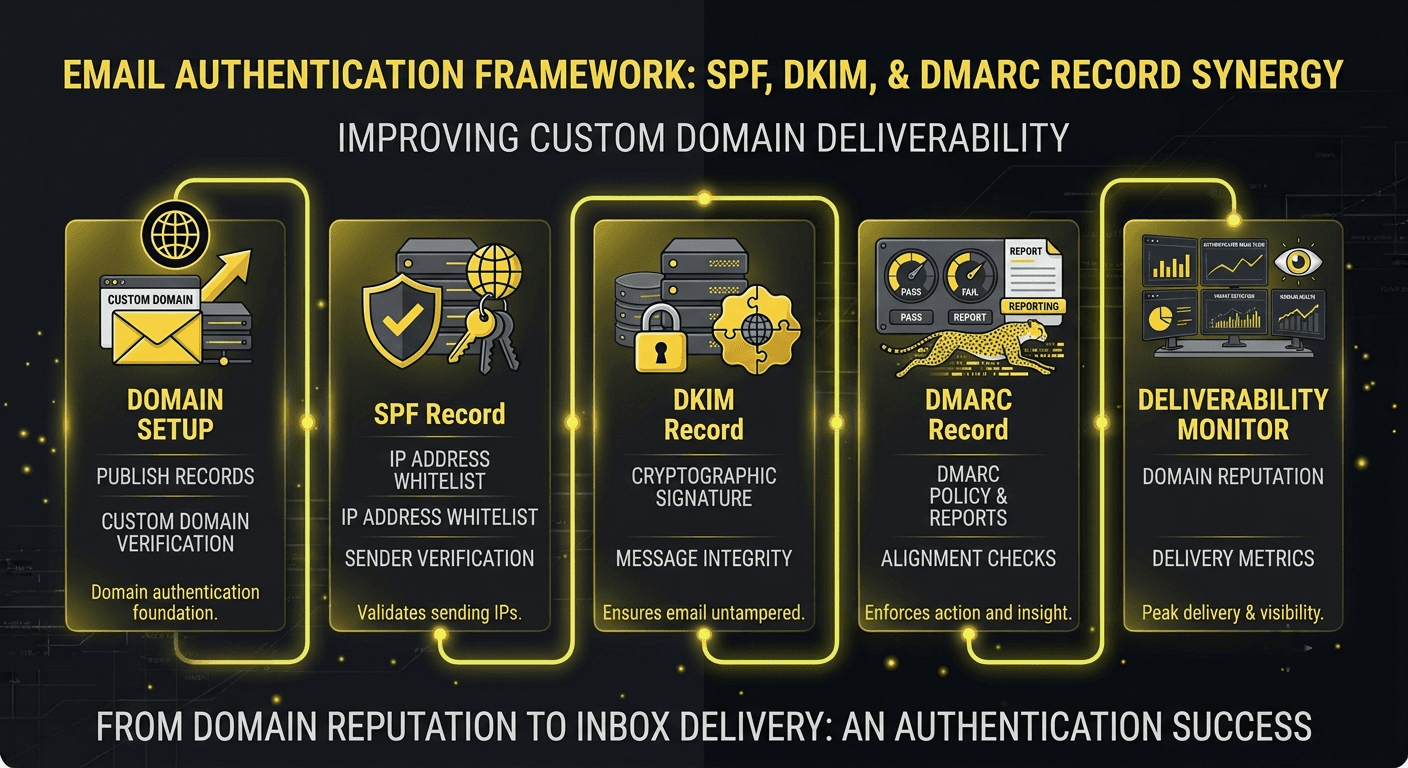
Pricing and how engagement works#
Email setup is priced as a fixed fee, since the scope is predictable once I know your domain and provider. Larger setups, like multiple domains or a transactional email system for an app with several email types, are quoted after a quick discovery call. You get a written price before any changes are made to your domain.
| Tier | Best for | Typical price | Timeline |
|---|---|---|---|
| Basic setup | One domain, one mailbox provider, standard records | Fixed price, quoted after discovery | 1 to 2 days |
| Team setup | Multiple mailboxes, aliases, and deliverability fixes | Fixed price, quoted after discovery | 2 to 4 days |
| App email setup | Transactional email for a website or app, plus domain records | Fixed price, quoted after discovery | 3 to 5 days |
Timeline: what to expect#
A basic setup for one domain usually takes 1 to 2 days of active work, though DNS changes can take up to 48 hours to fully propagate across the internet, which is normal and not a sign of anything going wrong. A setup that includes transactional email for an app or multiple mailboxes usually takes 3 to 5 days start to finish, including the follow up deliverability check.
How we will talk during the setup#
Because this is a shorter project, communication is simple: you get an update when each major step is done, not a long silence followed by a surprise handover. If anything needs your input, like confirming access to your domain registrar, I ask right away instead of letting it sit and delay the timeline.
What is included, what is not, and what happens if something breaks#
Every setup includes the mailbox configuration, all deliverability records, testing, and a follow up check about a week later. What is not included: ongoing management of a large team's mailboxes, or migrating years of old email history from a previous provider, which is quoted separately since it depends heavily on how much mail there is to move. If a deliverability issue shows up after launch that traces back to the setup, I fix it at no extra charge within the first 30 days.
Can you fix email that is already going to spam?#
Yes, and this is actually one of the most common requests I get. If your business email or your app's automated emails are already landing in spam, the fix is usually a misconfigured or missing SPF, DKIM, or DMARC record, and I can audit and correct this without moving you to a new provider. If the emails come from a web app you had built elsewhere, this setup pairs well with hosting and deployment to make sure the whole system is configured correctly end to end, and if you are also automating email sequences, that falls under automation and agent development.
A recent fix, in short#
One client had a signup form on their site that was supposed to send a welcome email, but almost none of their new users ever saw it because it was landing in spam. I audited their domain, found a missing DKIM record and a DMARC policy that was too loose, fixed both, and retested with real inboxes across Gmail, Outlook, and Yahoo. Within a week their welcome email open rate went from under 20 percent to over 90 percent. I wrote more about how this kind of thing happens in why your business emails keep going to spam.
What you get
Your emails actually get read
Correct SPF, DKIM, and DMARC setup means your proposals, invoices, and app emails land in the inbox instead of quietly disappearing into spam.
You look like a real business
A @yourbusiness.com address instead of a free gmail.com account builds instant trust with clients before they even open the email.
No more guessing why emails disappear
Deliverability testing before handover means you are not left wondering months later why a client says they never got your invoice.
Set up once, working correctly for good
The records and configuration are done properly the first time, so you are not troubleshooting spam issues every few months.
Why work with me
I have fixed enough broken email setups to know that most deliverability problems come down to one missing or misconfigured DNS record that nobody caught. Rather than just connecting a mailbox and calling it done, I test actual deliverability against real inboxes before I hand anything over, so you are not finding out about a problem three weeks later when a client says your invoice never arrived. You get the same senior level attention whether this is a one page fix or a full setup alongside a new app launch.
Other services
Questions
Frequently asked
Answers to the things clients ask before we start. Still unsure? Drop me a message.
How much does custom email setup cost?
A basic setup for one domain and one mailbox provider is quoted as a fixed price after a short discovery call, usually completed within a couple of days. Larger setups with multiple mailboxes or transactional email for an app cost more and are also quoted upfront in writing before any work starts.
How long does email setup take?
Most basic setups take 1 to 2 days of active work. DNS changes can take up to 48 hours to fully propagate, which is normal. Larger setups with transactional email or multiple mailboxes usually take 3 to 5 days start to finish.
Do I need to switch email providers to fix deliverability?
No, in most cases the fix is correcting your DNS records rather than switching providers. I can usually diagnose and fix deliverability issues on your existing setup without moving your mailboxes anywhere.
Can you set up email for automated messages from my app or website?
Yes. This includes setting up a transactional email service for things like order confirmations, password resets, and contact form notifications, plus the domain records needed so those emails land in the inbox reliably.
Ready when you are
Let's scope your custom email setup project.
Bring your requirements, your constraints, or just a rough idea. Thirty minutes, a clear plan, and a written quote — no obligation either way.