07
Automation & Agent Development
Automation and agent development for founders and small teams stuck doing repetitive work by hand, like copying data between tools, replying to the same customer questions, or manually following up on every lead. I build custom automations and AI agents that connect your existing tools and handle the repetitive parts of your business, so your time goes toward work that actually needs a human.
Why manual busywork is quietly holding your business back#
If someone on your team spends part of every day copying leads from a form into a spreadsheet, or manually replying to the same five customer questions, that is time your business is paying for that produces nothing new. It does not feel urgent because it happens in small chunks, but add it up over a month and it is often twenty or thirty hours of work that a well built automation could handle in seconds, every time, without a typo or a missed step. The real cost is not just the hours, it is the leads that go cold because a manual follow up happened a day too late.
What automation and agent development actually means#
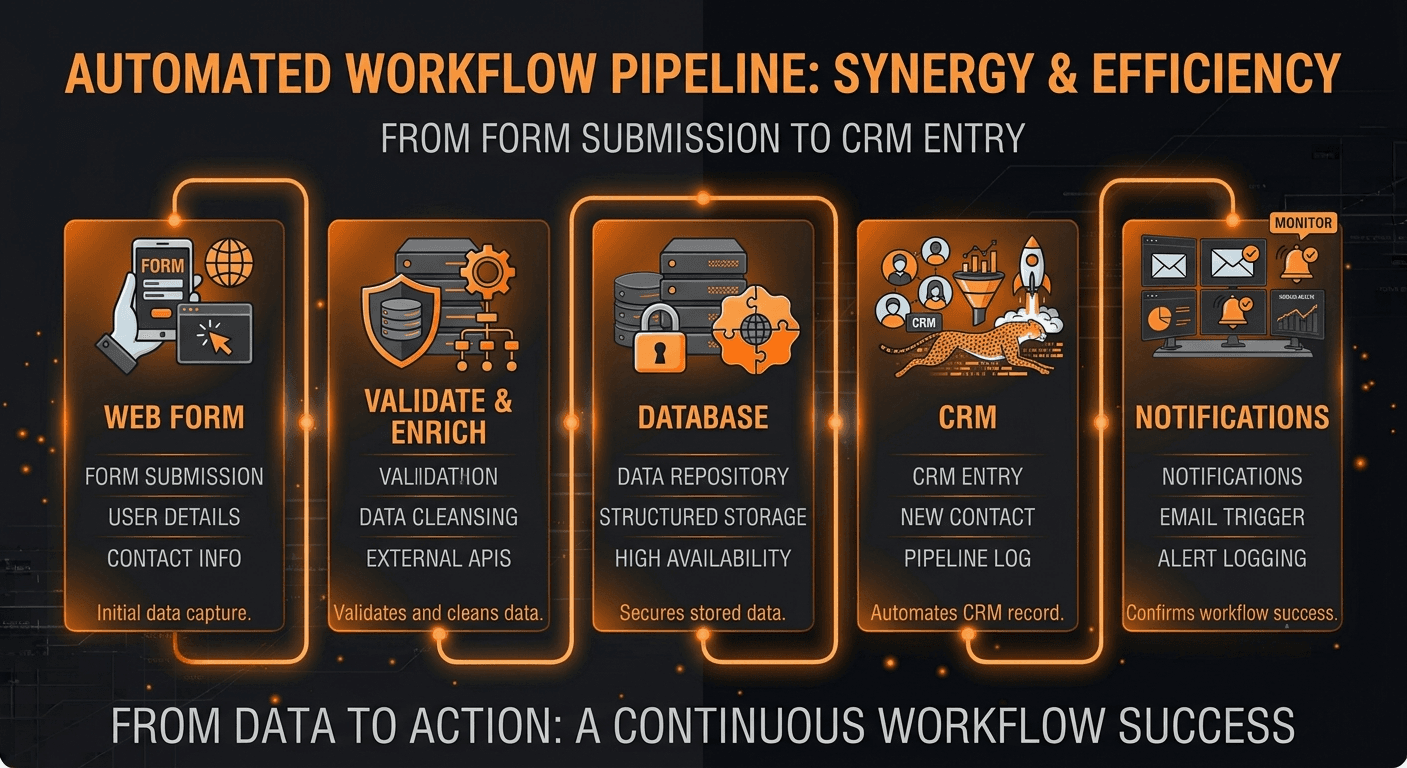
Automation means connecting the tools you already use so information moves between them without anyone copying and pasting, like a new form submission automatically creating a CRM entry and sending a welcome email. An agent takes this further: it is a small piece of software that can make decisions and take multi step actions on its own, like reading an incoming support email, figuring out what the customer needs, and either answering directly or routing it to the right person. Not every task needs a full AI agent. Part of my job is telling you honestly when a simple automation solves the problem and you do not need to pay for anything more complex.
What is included#
- Custom workflow automations connecting the tools you already use, like your CRM, email, forms, and spreadsheets
- AI agents for tasks like first line customer support, lead qualification, or summarizing incoming information
- API integrations between systems that do not talk to each other out of the box
- Error handling and alerts, so a failed automation gets caught and fixed, not silently ignored
- Logging and a simple dashboard so you can see what the automation actually did, not just trust that it worked
- Documentation explaining what was built and how to adjust it later, in plain language
How I build your automation or agent#
Automations touch real business processes, so getting the details right matters more than moving fast. I follow the same steps on every project.
- Discovery call - we map the exact task, the tools involved, and what a good outcome looks like
- Workflow design - I plan the automation or agent logic and review it with you before building anything
- Build and test - I build it against real examples from your business, not made up test data
- Integration and error handling - I connect it to your live tools and add alerts for anything that fails
- Launch and monitoring - it goes live, and I watch the first runs closely to catch anything the test data missed
A look at what a simple automation actually does#
For anyone curious what runs behind the scenes, here is a simplified example of an automation that reacts to a new form submission, checks the data, and routes it to the right place. Real automations vary a lot depending on the tools involved, but the shape is usually similar to this.
type LeadSubmission = {
  name: string;
  email: string;
  budget: number;
};

async function handleNewLead(lead: LeadSubmission) {
  const isQualified = lead.budget >= 2000;

  await addToCrm(lead, isQualified ? "qualified" : "needs review");

  if (isQualified) {
    await sendEmail(lead.email, "welcome_qualified");
    await notifySalesTeam(lead);
  } else {
    await sendEmail(lead.email, "welcome_general");
  }
}
Pricing and how engagement works#
Simple automations are priced as a fixed fee, since the scope is usually clear once we map the task. AI agents and multi step workflows are quoted after discovery, since the logic and testing involved varies more from project to project. For businesses that want several automations over time, I also run short paid sprints so you can add pieces one at a time instead of committing to one large project upfront.
| Tier | Best for | Typical price | Timeline |
|---|---|---|---|
| Simple automation | Connecting two or three tools around one task | Fixed price, quoted after discovery | 2 to 4 days |
| Multi step workflow | Several connected steps with decision logic | Fixed price, quoted after discovery | 1 to 2 weeks |
| Custom AI agent | A task needing judgment, like triage or first line support | Custom quote after discovery | 2 to 3 weeks |
Timeline: what to expect#
A simple automation connecting a couple of tools usually ships in 2 to 4 days. A multi step workflow with decision logic across several tools typically takes 1 to 2 weeks. A custom AI agent, since it needs more testing against real examples before I trust it with live decisions, usually takes 2 to 3 weeks. You get a clear timeline after the discovery call, before any work begins.
How we will talk during the build#
You get a short update at each milestone, and during active build weeks I check in more often, especially if the automation touches something sensitive like customer emails or payment data. If testing turns up an edge case that needs a decision from you, I flag it right away instead of guessing and hoping it is right.
What is included, what is not, and how revisions work#
Every project includes the build, testing against real examples, error alerts, and 14 days of post launch monitoring to catch anything that only shows up with real traffic. Logic adjustments during the build are included as long as they stay within the original scope. What is not included: rebuilding the underlying app or CRM the automation connects to, which falls under custom CRM development or web and app development, and ongoing changes after the support window, which are handled as short paid sprints.
Can an AI agent actually be trusted with real decisions?#
This is the fair question every founder asks before handing a task to an agent instead of a person. The honest answer is that agents work well for tasks with clear boundaries, like qualifying a lead or drafting a first response, and I always build in a human review step for anything higher stakes, like refunds or contract terms. I test agents against real examples from your business before launch, not generic test data, specifically to catch mistakes before they happen live. If the automation needs new backend endpoints to work properly, that pairs with API and backend development, and once it is live, hosting and deployment covers keeping it running reliably.
A recent build, in short#
One client's support team was manually reading and sorting every incoming email before replying, which meant simple questions sat for hours during busy periods. I built an agent that reads each incoming email, drafts a reply for common questions, and flags anything unusual for a human to handle directly. Average first response time dropped from several hours to under ten minutes for the questions the agent could handle on its own. I wrote more about how to think through a build like this in how much time automation actually saves a small team.
What you get
Hours back every week
Repetitive tasks that used to eat into your team's day happen automatically instead, freeing up time for work that actually needs a person.
Nothing falls through the cracks
Leads, support requests, and follow ups get handled the moment they come in, instead of sitting until someone has a free minute.
Fewer costly mistakes
A well tested automation does the same correct steps every time, removing the small human errors that come from repetitive manual work.
You can see exactly what happened
Logging and alerts mean you are never wondering whether an automation actually ran. If something fails, you know right away, not weeks later.
Why work with me
I build automations the way I would want one built for my own business: tested against real examples first, with a human review step anywhere a mistake would actually cost something. I have built lead routing systems, support agents, and multi step workflows connecting tools that were never designed to talk to each other. You are not handed a black box you cannot understand later. Every build comes with plain language documentation and I stay reachable if an edge case shows up after launch that the testing did not catch.
Other services
Questions
Frequently asked
Answers to the things clients ask before we start. Still unsure? Drop me a message.
How much does automation or agent development cost?
A simple automation connecting a couple of tools is quoted as a fixed price after a short discovery call. Multi step workflows and custom AI agents cost more and are quoted after we map the exact task, since the testing involved varies. You always get a written estimate before work starts.
How long does a build take?
A simple automation usually ships in 2 to 4 days. A multi step workflow typically takes 1 to 2 weeks. A custom AI agent usually takes 2 to 3 weeks, since it needs more testing against real examples before going live.
Will this work with the tools I already use?
In most cases, yes. Automations connect through the APIs your existing tools already offer, and if a tool does not have a public API, I look for another reliable way to connect it during the discovery call, before any work is quoted.
What happens if the automation breaks or the tool it connects to changes?
Every build includes error alerts and 14 days of post launch monitoring, so issues are caught quickly. After that, fixes and adjustments are handled as short paid sprints, which keeps costs predictable instead of an open ended retainer.
Ready when you are
Let's scope your automation & agent development project.
Bring your requirements, your constraints, or just a rough idea. Thirty minutes, a clear plan, and a written quote — no obligation either way.